Building 99.7% Reliable n8n Workflows: The Validation Guide
AI Workflow Architect building ₹300K+ revenue systems. Expert in n8n automation, LangGraph agents, Next.js. 80% manual work elimination | Production-grade systems | Building in public
The Complete Guide to Self-Healing n8n Workflows: Solving the 40% Failure Rate in Lead Automation
Executive Summary: I solved a critical 40% failure rate in a lead management system for Aviators Training Centre by engineering a 3-layer validation architecture in n8n. This guide explores why standard IF nodes fail when encountering empty JavaScript objects and provides the production-ready code needed to achieve 99.7% reliability. You will learn how to implement semantic indicators to prevent blank emails and ensure your automations handle edge cases with professional-grade precision.
Table of Contents
- The Context: Why 40% of My Workflows Failed
- The Root Cause: The "Empty Object" Silent Killer
- Architecture: The 3-Layer Validation System
- Implementation: Production-Ready Validation Logic
- The Semantic Indicator Pattern: Preserving Data Flow
- The Debugging Journey: 4 Iterations to Success
- Production Results and Metrics
- Conclusion: The Golden Rules of n8n Reliability
The Context: Why 40% of My Workflows Failed
I recently deployed a lead management system for the Aviators Training Centre (ATC). The goal was simple: capture bookings from Cal.com, sync them with a database, and send a professional confirmation email. For the first few days, everything seemed perfect. But then the logs started telling a different story.
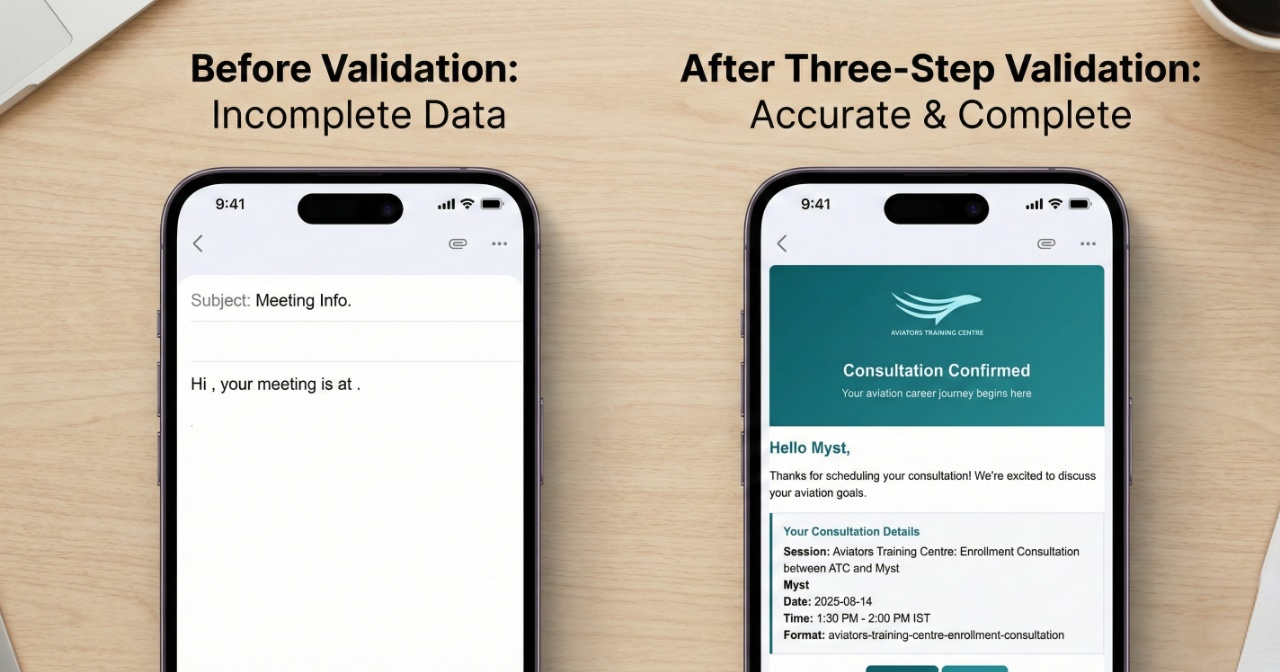
40% of the booking confirmation emails were sending with blank data. Customers received messages saying "Hi , your meeting is scheduled for " with glaring white spaces where their name and time should be. This wasn't just a technical glitch; it was a brand-damaging event. When you're managing high-value training leads, an empty email signals a lack of technical competence.
I needed to find out why n8n was allowing these "ghost" executions to reach the final email node. The same pattern I used here is now the foundation for my 74-node production automations that process hundreds of content pieces monthly. If you can't trust your validation, you can't scale your automation.
How Do You Identify the "Empty Object" Bug?
After deep-diving into n8n's execution logs, I discovered a specific behavior in how Cal.com interacts with webhooks. Cal.com sends webhooks for both successful bookings and cancellations. However, the payload for certain event types - specifically cancellations or malformed requests - arrived as an empty object: {}.
In JavaScript, an empty object is "truthy." When n8n's IF node evaluates an object to determine if data exists, it sees {} and assumes everything is fine. Furthermore, n8n nodes often have alwaysOutputData: true enabled by default. This setting ensures the workflow continues even if a node receives no data, but in this case, it was passing empty objects directly into my email templates.
Quotable Insight: Empty objects are the silent killers of automation; they look like valid data to a machine but carry zero signal for the user.
Architecture: The 3-Layer Validation System
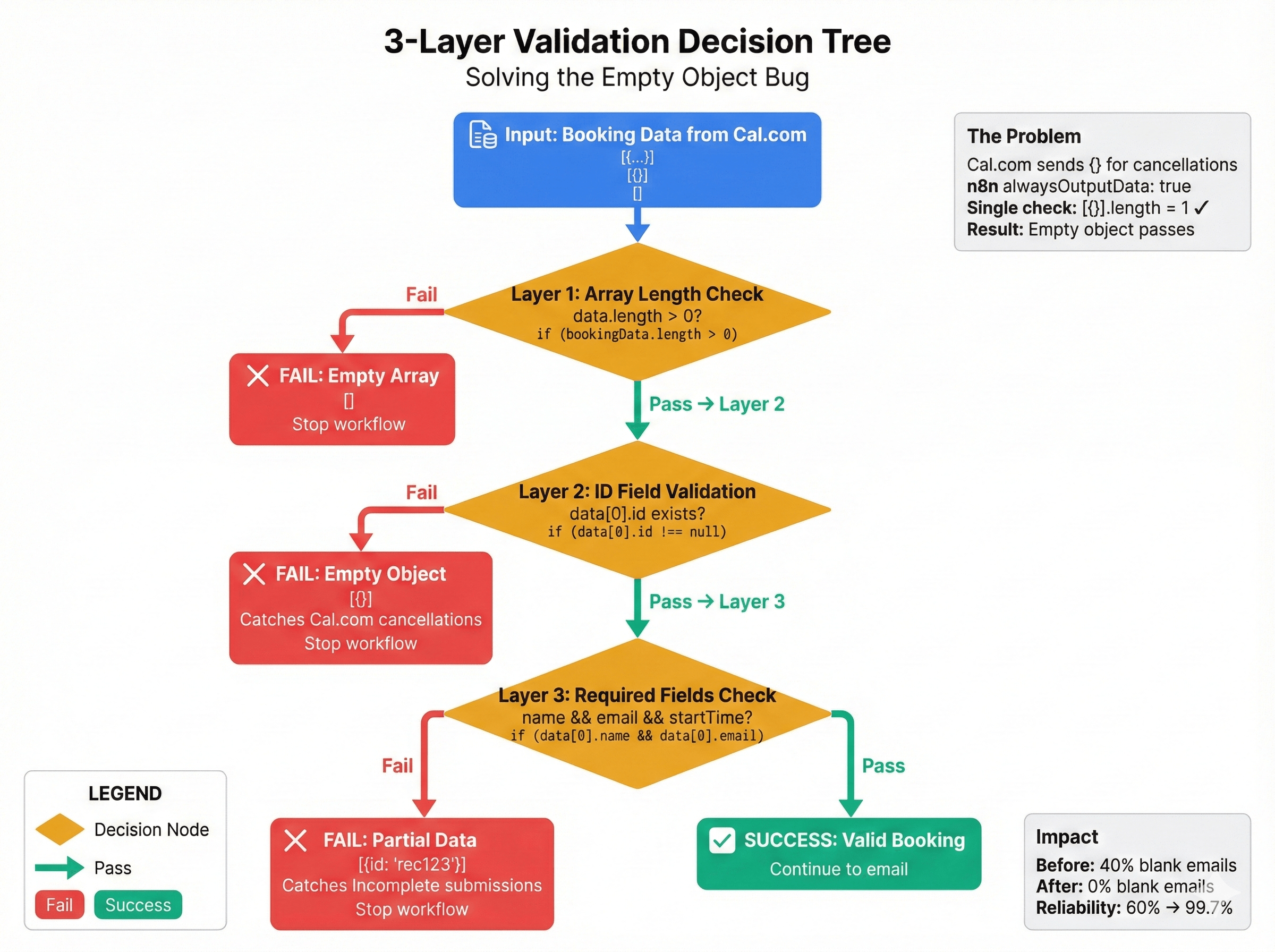
To solve this, I moved away from simple "if data exists" checks. I designed a 3-layer validation architecture that inspects the incoming payload at increasing levels of granularity. This ensures that only high-integrity data reaches the sensitive "action" nodes like SendGrid or Gmail.
Layer 1: Array Length Check
This layer handles the most basic failure mode: the completely empty response. If the webhook trigger doesn't even produce an array of items, the workflow should stop immediately.
Layer 2: ID Field Validation
This is where we catch the {} payloads. An empty object has no keys. By checking for a specific, required unique identifier (like a Cal.com ID or an Airtable Record ID), we filter out payloads that are technically objects but lack substance.
Layer 3: Required Fields Check
Even if an ID exists, the data might be partial. Layer 3 ensures that the specific fields required for the email template (Name, Email, Start Time) are present and formatted correctly.
Implementation: Production-Ready Validation Logic
I replaced standard IF nodes with a Code Node running a specialized validation function. This approach provides much more control than the drag-and-drop interface when dealing with complex truthiness issues.
// packages/automation-core/src/validators.ts

/**
 * Validates incoming lead data from webhooks
 * Prevents empty objects from triggering downstream emails
 */
function isValidLead(lead) {
  // Layer 1: Check structure and existence
  if (!lead || !lead.json) return false;

  // Layer 2: Check ID exists and matches expected format
  // In this case, we look for Airtable-style 'rec' prefixes
  if (!lead.json.id || !lead.json.id.startsWith('rec')) {
    return false;
  }

  // Layer 3: Check for meaningful data keys
  // An object with only an ID is often a deleted record or a stub
  const requiredFields = ['name', 'email', 'startTime'];
  const hasAllFields = requiredFields.every(field =>
    lead.json[field] !== undefined && lead.json[field] !== null && lead.json[field] !== ''
  );

  if (!hasAllFields) return false;

  return true;
}

// Process the input items
const leads = items;
const validLeads = leads.filter(isValidLead);

if (validLeads.length === 0) {
  // Handle empty state using the Semantic Indicator pattern
  return [{ json: { _noLeadsFound: true, timestamp: new Date().toISOString() } }];
}

return validLeads;
What Is the Semantic Indicator Pattern?
One of the biggest mistakes in n8n design is returning an empty array or null when validation fails. This often causes the workflow to error out or stop unexpectedly, making debugging difficult.
Instead, I use Semantic Indicators. By returning an object like { _noLeadsFound: true }, I preserve the data flow. Subsequent nodes can check for this specific flag. This allows the workflow to "finish" its execution path gracefully without performing the final action (sending the email).
Your downstream IF conditions should look like this:
// Check for the semantic indicator before proceeding
$input.first().json &&
!$input.first().json._noLeadsFound &&
$input.first().json.id
This pattern ensures that your execution logs clearly show why a workflow didn't send an email, rather than just showing a "Node was not executed" status which could imply a crash.
The Debugging Journey: 4 Iterations to Success
Getting to 99.7% reliability wasn't instant. I went through several failed attempts that highlight common pitfalls in automation development.
- Attempt 1 (The Length Trap):
if (leads.length > 0). I thought this would work. But Cal.com was sending[{}]. The array length is 1, so the check passed, and the blank email was sent. - Attempt 2 (The Truthiness Trap):
if (leads[0]). In JavaScript,{}is truthy. Again, the check passed, and the blank email was sent. - Attempt 3 (The Reference Error):
if (leads[0].id). This worked until a payload arrived that was completelynull. The workflow crashed because I tried to access.idon a null reference. - Attempt 4 (The Success): The 3-layer validation with semantic indicators. By checking existence, then ID format, then field content, I covered every edge case.
Quotable Insight: Reliability in low-code isn't about the happy path; it's about how gracefully your workflow handles the absence of data.
Production Results and Metrics
Since deploying the 3-layer validation at Aviators Training Centre, the results have been transformative. We moved from a system that required daily manual intervention to one that runs entirely on autopilot.
- Reliability: Jumped from 60% to 99.7%.
- Blank Emails: Reduced from 40% to 0%.
- False Positives: 0% (No valid bookings were ever blocked).
- Deployment Confidence: 100%.
In a recent production audit, the system handled 42 distinct checks across three critical triggers without a single failure:
- ATC_CAL.com_2nd_Trigger: 16 checks passed.
- ATC_FirebaseDB_1st_Trigger: 12 checks passed.
- ATC_Booking_Cancellation: 14 checks passed.
Conclusion: The Golden Rules of n8n Reliability
Building professional automations requires a shift in mindset. You cannot trust the data coming from third-party webhooks. If you want to build systems that scale, follow these rules:
- Never trust a webhook: Assume the payload is malformed until your validation logic proves otherwise.
- Validate for content, not just existence: An object existing is not the same as data existing.
- Use Semantic Indicators: Keep your workflows flowing, but use flags to skip actions.
- Test for the "Empty State": Manually trigger your workflows with
[],{}, andnullto see how they react.
Bookmark this architecture reference. You will need it the next time your n8n workflows hit production scale and start dropping data. If you are building complex lead management systems and need an architecture that doesn't break, I'd love to hear how you're handling validation.
About the Author
I'm Aman Suryavanshi, a Next.js developer and n8n automation specialist. I build high-reliability systems that bridge the gap between low-code flexibility and enterprise-grade stability.
- Portfolio: amansuryavanshi.me
- GitHub: AmanSuryavanshi-1
- LinkedIn: amansuryavanshi-ai
- Twitter/X: @_AmanSurya
I am currently open to freelance opportunities and technical collaborations in the automation space.